Skip to content
Nuvyqo logo NuvyqoDigital Business Solutions Email Nuvyqo

Database Automation

Turn scattered records into reliable business operations.

Database automation helps businesses move from manual spreadsheets and disconnected records to structured data, accurate reports, faster follow-ups and controlled operating workflows.

Data validation SQL Server Workflow automation Dashboards Reporting Exception handling
Nuvyqo Automation Architecture Workflow active
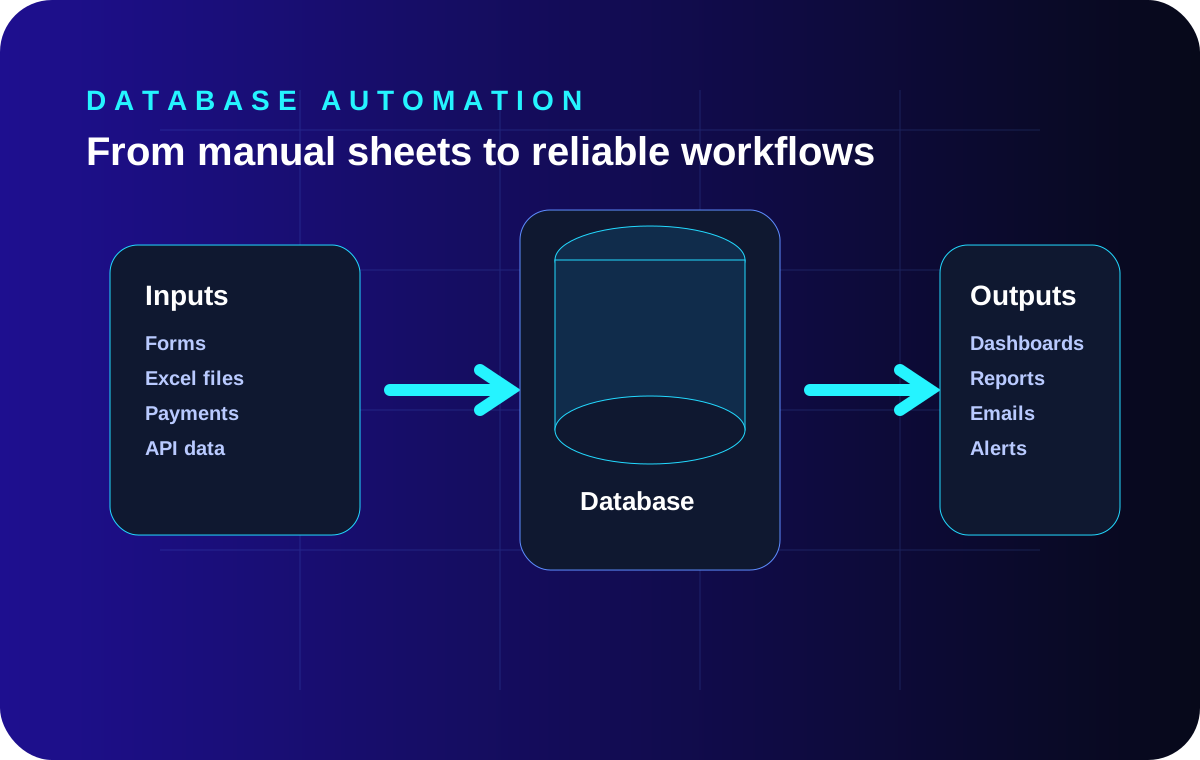
CollectForms, files, payments and APIs
ValidateRules, duplicates and exceptions
StoreStructured tables and audit history
ActEmails, dashboards and tasks
4Workflow stages
6Use-case patterns
1Reliable data layer
Now processing: Structured intake Communication: Email only
Data IntakeControlled
Validation RulesActive
Structured StorageReliable
Exception QueueVisible
DashboardsConnected
Email ActionsReady

Why automation matters

Database automation turns scattered work into reliable operations.

Many businesses begin with spreadsheets, manual follow-ups and disconnected reports. That can work temporarily, but risk increases as enquiries, payments, customers, inventory, students, orders or service records grow.

Database automation creates a controlled system where forms, payments, imports, dashboards, alerts and reports work from one dependable data foundation. It does not simply remove manual work; it makes the business process easier to trace, validate, measure and improve.

Scattered recordsDifferent teams maintain different versions of the same information.
Repeated correctionMissing fields, duplicates and inconsistent statuses require manual repair.
Delayed follow-upImportant actions depend on someone remembering to check a file or inbox.
Weak visibilityManagement reports arrive late or do not match operational reality.

Common use cases

Start where repeated manual work creates visible business risk.

Useful automation commonly begins with file imports, payment-linked actions, lead management, dashboards, scheduled reporting or data-quality controls. The best first workflow is usually important enough to matter but contained enough to measure safely.

Practical workflow

Every reliable automation needs a controlled path from intake to action.

StageWhat happensBusiness value
CollectForms, uploads, payments or API data are captured.Less manual entry.
ValidateRules check duplicates, missing fields and invalid data.Cleaner operations.
StoreData moves into structured tables with consistent status and history.Reliable reporting.
ActDashboards, emails, access grants or tasks are triggered.Faster execution.

When to start

Automate when delay, errors or weak visibility become repeatable.

Automation is useful when manual work causes delay, repeated mistakes, weak reporting, missed follow-ups or unclear revenue visibility. The safest starting point is usually one important workflow: enquiry to follow-up, payment to access, or data import to dashboard.

The objective should be clear before development begins. Define what enters the workflow, what rules apply, what happens when data is uncertain and how the result will be measured.

Database automation use cases

Six practical places where structured data can reduce repeated work.

Each pattern can begin as a focused project and later connect with dashboards, CRM, payments, portals or wider automation.

01

Structured Excel and CSV imports

Move uploaded files into controlled database tables with field mapping, validation, duplicate checks and import reporting.

Less repeated entry
02

Payment-to-access workflows

Connect captured payments with account status, resource access, receipts, exception queues and reconciliation reports.

Faster fulfilment
03

Lead and CRM management

Capture enquiries, assign owners, schedule follow-ups and maintain a reliable history of lead activity and status.

Fewer missed leads
04

Management dashboards

Turn operational records into live views of sales, payments, registrations, service delivery and pending actions.

Clearer decisions
05

Scheduled reports and alerts

Generate regular reports, reminders and exception alerts without depending on someone to check every record manually.

Earlier action
06

Data cleanup and validation

Apply consistent status values, mandatory fields, duplicate controls and repair workflows before automation expands.

More reliable data

Interactive workflow

Collect, validate, store and act—from one reliable data path.

Select each stage to see the controls and business value that make automation dependable.

Selected workflow stage

Capture information from the right sources

Forms, uploads, payments, APIs and internal systems feed information into a controlled intake layer.

Less manual entry
  • Website and internal forms
  • Excel or CSV uploads
  • Payments and API events

Manual vs automated operations

Automation improves control when the process—not only the software—is designed properly.

The practical difference appears in consistency, visibility, exception handling and the time required to complete routine work.

Operational areaManual approachControlled automated approach
Data intakeRecords are copied from forms, files or emails.Inputs enter a defined intake process with source and timestamp.
ValidationErrors are discovered later during reporting or service delivery.Rules identify missing, duplicate or invalid records before action.
Status trackingTeams update separate sheets using different labels.Status definitions are controlled and changes can be audited.
Follow-upActions depend on personal reminders and inbox checking.Tasks, emails or exception alerts are triggered by defined conditions.
ReportingReports are manually combined from multiple files.Dashboards and reports use validated operational data.
ExceptionsProblem records may remain hidden until a complaint occurs.Uncertain records move into a visible review or repair queue.

Automation readiness

When should a business automate?

Start when repeated manual work is creating measurable delay, errors, poor follow-up or weak management visibility. Do not begin by trying to automate every process at once.

Choose one workflow with a clear owner, stable business rules and an outcome that can be measured. Then expand after the data and exception process are reliable.

Explore Business Automation

Signals that automation may be justified

  • The same information is copied between spreadsheets, emails and systems.
  • Reports require repeated manual compilation before management can use them.
  • Teams cannot agree on which record or status is correct.
  • Payments, orders, registrations or service requests need manual follow-up.
  • Duplicate, missing or inconsistent data causes operational errors.
  • Important enquiries or pending actions are difficult to track.

Implementation path

Automate in phases so the process remains understandable and controlled.

A phased approach reduces the risk of connecting automation to unclear rules or unreliable data.

01

Discover

Map the current workflow, users, data sources, pain points, approvals and expected outcome.

02

Stabilise

Clean the data structure, standardise statuses and define validation and exception rules.

03

Automate

Connect intake, processing, alerts, dashboards and approved operational actions.

04

Measure

Track accuracy, turnaround time, exception volume, completion and management visibility.

What to measure

Judge automation by business outcomes—not by the number of features built.

Baseline the current process before implementation, then compare the same operational measures after launch.

01

Manual touchpoints

How many human actions are required before and after automation?

02

Processing time

How long does one record take from intake to completed action?

03

Exception rate

How many records fail validation or require manual correction?

04

Follow-up completion

Are assigned actions completed on time and visible to managers?

05

Report preparation

How much time is spent compiling operational or management reports?

06

Data consistency

Do teams use the same status definitions and source of truth?

Database automation FAQ

Questions businesses ask before automating operational data.

These answers explain where to start, how existing systems can be used and why exceptions and human controls remain important.

Does database automation mean replacing every spreadsheet?

No. Spreadsheets can remain useful for analysis, temporary uploads or controlled exports. Automation becomes valuable when important operational records need validation, history, permissions, repeatability and dependable reporting.

Which workflow should a business automate first?

Start with one process that has clear business value and repeated manual effort. Common starting points include enquiry-to-follow-up, payment-to-access, file-import-to-dashboard and scheduled operational reporting.

Can automation work with an existing SQL Server database?

Yes. Existing databases can often be reviewed, cleaned and extended. The safest path is to understand the current schema, data quality, stored procedures, integrations and production dependencies before making changes.

How should errors and exceptions be handled?

Automation should not hide errors. Invalid or uncertain records should move into a visible exception queue with clear reasons, assigned responsibility and a controlled repair or approval process.

Can dashboards use the same automated data?

Yes. Dashboards are most useful when they read from the same validated operational data used by the workflow. This reduces conflicting figures and makes pending work, trends and exceptions easier to understand.

Does every automated action need human approval?

Not every action requires approval, but sensitive actions should have appropriate controls. Access grants, financial adjustments, deletions and high-impact decisions may require review, audit history or role-based approval.

Continue exploring

Related Nuvyqo services and guides.

Continue from data structure into workflow automation, reporting, database quality and practical implementation planning.

Email-only business enquiries

Describe one database or workflow problem you want to improve.

Email Nuvyqo with the current process, data source, repeated issue, users involved and result you want to achieve. The requirement will be reviewed and answered through email.

Excel and CSV imports SQL Server workflows Dashboards and reporting CRM and payment automation
Email hello@nuvyqo.com